GRAND OPENING ✦ 20% OFF THE ENTIRE LATTICE SUITE ✦ ENDS MARCH 31 ✦ GRAND OPENING ✦ 20% OFF THE ENTIRE LATTICE SUITE ✦ ENDS MARCH 31 ✦ GRAND OPENING ✦ 20% OFF THE ENTIRE LATTICE SUITE ✦ ENDS MARCH 31 ✦ GRAND OPENING ✦ 20% OFF THE ENTIRE LATTICE SUITE ✦ ENDS MARCH 31 ✦ GRAND OPENING ✦ 20% OFF THE ENTIRE LATTICE SUITE ✦ ENDS MARCH 31 ✦ GRAND OPENING ✦ 20% OFF THE ENTIRE LATTICE SUITE ✦ ENDS MARCH 31 ✦ GRAND OPENING ✦ 20% OFF THE ENTIRE LATTICE SUITE ✦ ENDS MARCH 31 ✦ GRAND OPENING ✦ 20% OFF THE ENTIRE LATTICE SUITE ✦ ENDS MARCH 31 ✦

Lattice Command

The execution half of the Lattice Suite. Hardened order-network automation with persistent state, Ghosting Technology™, instant parallel close, dual distance modes, and multi-layer safeguards. Take the parameters you discovered in Vision and deploy them into real markets with confidence.

Lattice Command™ is execution automation software developed by Cave and Fire Group Pty Ltd. It does not generate trading signals, provide financial advice, or guarantee any outcome.

Lattice Command

Software Disclosure: Cave & Fire Lab is a trading name of Cave and Fire Group Pty Ltd., a software development company. We are not a financial services provider, broker, fund manager, or advisory firm. We do not provide financial advice, trading signals, or recommendations of any kind. Our products are software tools that automate user-defined parameters. All configuration, deployment decisions, and trading outcomes are the sole responsibility of the user.

What It Does

Lattice Command is the execution half of the Lattice Suite. Once you've shaped and validated your parameters with Lattice Vision, Command is how you actually deploy them — first through proper backtesting in the MetaTrader 5 strategy tester, then forward testing, and ultimately live execution with real capital.

Most automated systems fail in production not because the underlying logic is flawed, but because they don't handle the reality of execution: disconnections, slippage, partial fills, broker inconsistencies, server restarts. Command is engineered from the ground up to handle all of it. Hardened persistent state means the software always knows exactly where it is, even after a crash or restart — no orphaned positions, no duplicate orders, no confused state.

Two decades of observing how systems fail in live environments has informed every design decision. This is production-grade software built from real operational experience — specifically engineered to survive the things that commonly go wrong.

Command extends beyond Vision's simulation with advanced trigger options that aren't available in the analysis environment: consolidated execution when multiple levels are crossed rapidly, recross confirmation that waits for price to re-interact with a level before executing, and direction inversion for contrarian workflows. These are the refinement tools you use after discovering your base parameters in Vision.

Like all Cave & Fire Lab software, the logic is fully transparent. Detailed on-chart dashboard, execution state indicators, and comprehensive logging mean you can see exactly what the engine is doing, why it's doing it, and verify it matches your expectations at all times.

Full order network on chart

Your order network is visualised on chart with basic horizontal lines hidden from the market — Ghosting, awaiting further price interaction

Ghosting Technology™

Ghosting Technology™ is a proprietary trigger-filtering system shared across the entire Lattice Suite — and it fundamentally changes how order networks engage with the market.

The problem: when price first enters a lattice, the initial interactions are often noise. Traditional networked-order systems execute on every crossing indiscriminately, building early exposure during unstable conditions before the market has committed to a direction. That premature positioning can drag the entire basket into an unfavourable state before the real move even begins.

Ghosting Technology™ defines a configurable threshold of initial interactions that are tracked but not executed. These "ghost" triggers count toward the basket lifecycle and appear on the chart as distinct visual markers, but no order is placed. Only after the ghost threshold is exceeded do subsequent interactions trigger real execution. The result is an intelligent positioning phase that filters out noise and lets your network engage when price has demonstrated real commitment.

The ghosting logic is identical between Vision and Command. The ghost count you discovered works best during visual analysis produces exactly the same filtering behaviour when executing live orders. No surprises. No discrepancy. This is the continuity that makes the Lattice Suite work as a genuine pipeline from analysis to deployment.

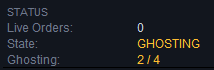
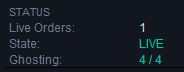
Ghosting state active

Ghosting state active — 4 of 4 ghost triggers tracked, zero live orders.

(5 years of data in 5 minutes — watch Leon's settings discovered in Lattice Vision at work )

Instant Parallel Close

When a basket hits its target threshold, speed matters. In fast-moving markets, the difference between closing all positions instantly versus closing them one-by-one can be the difference between locking in profit and watching it evaporate.

Lattice Command's parallel close fires closure requests for all active positions simultaneously rather than sequentially. Traditional sequential closing means each position waits for the previous one to confirm before the next request is sent — and in a basket with multiple positions, that delay can cost significant slippage as price moves against you during the closure process.

Parallel close eliminates that problem. All positions receive their closure instructions at the same moment, minimising the window of exposure during the critical closing phase. This is especially important during volatile conditions, news events, or any scenario where price is moving rapidly.

The feature is configurable — you can enable parallel close for maximum speed or disable it to use sequential closing if your broker or account type handles it better. Either way, you're in control.

The Lattice Suite — One Workflow, Two Tools

Lattice Vision and Lattice Command share the same underlying engine: identical lattice construction, identical Ghosting Technology™, identical distance modes, and identical parameter definitions. Settings transfer directly between them with complete fidelity — no translation layer, no configuration mismatch.

Step 1: Discover & Shape (Vision)

Rapidly explore configurations across historical data. Adjust distances, lot sizes, ghost counts, targets, and distance modes. Observe basket behaviour, drawdown characteristics, and outcome patterns across years of data in real time. Save promising configurations to presets.

Step 2: Backtest & Refine (Command)

Transfer your discovered settings to Command. Run proper tick-by-tick backtests in the MT5 strategy tester with the full execution engine — including advanced trigger options like consolidated execution, recross confirmation, and Ghosting Technology™ operating with real order management. Refine your ghost count, test parallel close, and validate risk safeguards.

Step 3: Forward Test & Deploy (Command)

Deploy with Command's hardened architecture — persistent state recovery, multi-layer risk safeguards, adaptive broker compatibility, instant parallel close, and 24/7 VPS reliability. The same parameters, the same ghosting logic, the same lattice behaviour — now executing real orders with production-grade resilience.

Execution Engine

20-Level Order Network

Up to 20 configurable execution levels — 10 upper (sell) and 10 lower (buy). Independent spacing and independent lot sizing per level. The same structure you shaped in Vision, now executing real orders. Supports uniform lattice shapes, progressive configurations, asymmetric layouts, or any custom design.

Dual Distance Modes

PIPS Mode: Fixed pip-based spacing — constant distances regardless of market conditions. ATR Mode: Adaptive spacing using Average True Range over a configurable lookback period. Distances automatically expand in volatile markets and contract in quiet ones. In ATR mode, the basket target threshold is also expressed in ATR multiples and converted to account currency at the point of lattice construction. Both modes match Vision exactly.

Consolidated Execution

When price moves fast and crosses multiple lattice levels between ticks, Command can consolidate what would have been several separate orders into fewer, larger ones. This reduces position count while maintaining proportional exposure — fewer open trades to manage, same net effect. Configurable thresholds determine when consolidation kicks in.

Recross Confirmation

An additional confirmation layer that delays execution until price re-interacts with a triggered level. Instead of executing immediately when price crosses a line, the system waits for price to come back and cross it again — filtering out fast spikes that touch a level once and never return. Can be combined with consolidated execution and ghosting for highly refined trigger behaviour.

Direction Inversion

Reverse the execution direction with a single parameter. Upper crossings execute buy orders, lower crossings execute sell orders. Deploy contrarian configurations that were validated in Vision's reverse mode. The inversion is applied cleanly at the execution layer without changing the underlying lattice logic.

Periodic Lattice Recalibration

The order network automatically recentres on the SMA reference at configurable intervals. When no basket is active, the lattice stays fresh and aligned with current price structure rather than anchored to a stale level. Optional lattice locking prevents recalibration during an active basket. Identical logic to Vision.

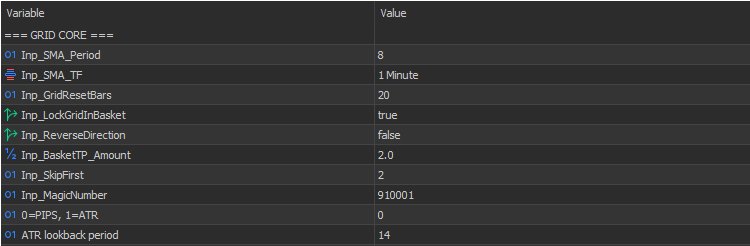
Lattice Core Settings

Lattice core settings panel

SMA period, timeframe anchoring, lattice reset interval, basket target, skip-first filtering, magic number, distance mode selection, and ATR lookback — all configurable per-instance.

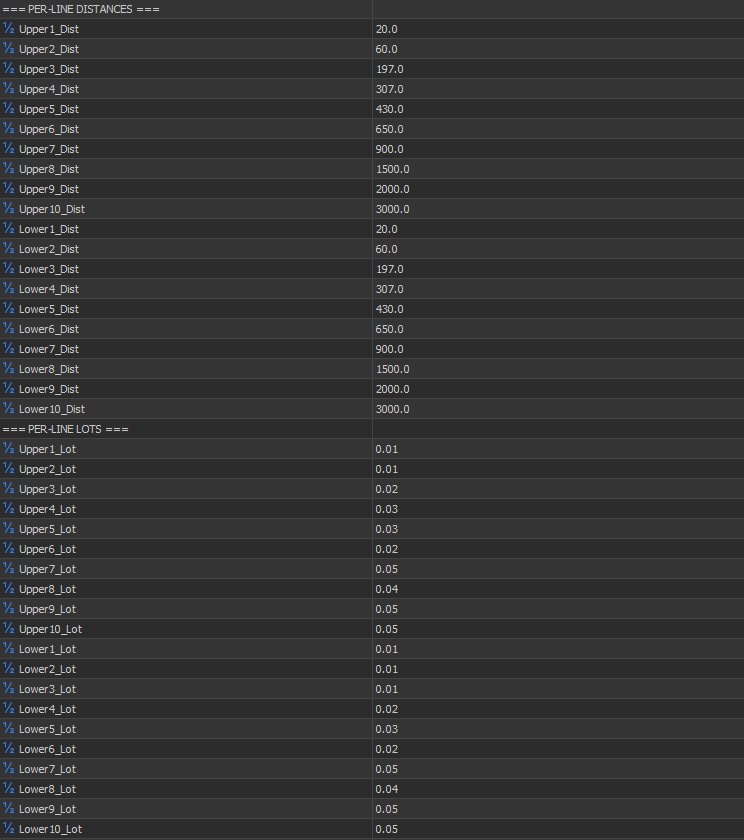
Per-Line Distances

Per-line distance and lot configuration

Independent upper and lower distances for all 10 levels per side, plus independent lot sizing per level — complete asymmetric control.

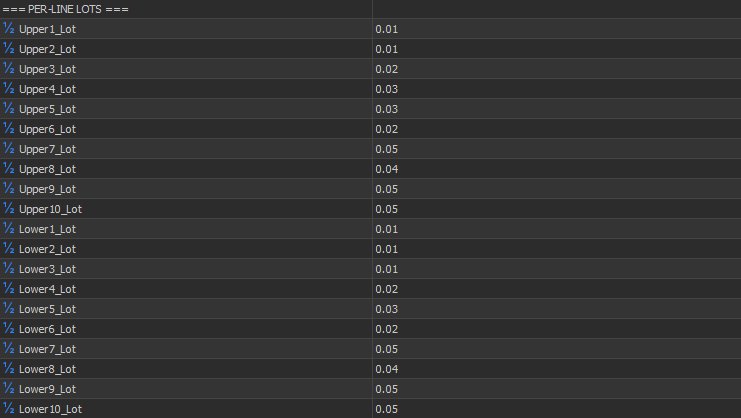
Per-Line Lot Sizing

Per-line lots for upper and lower sides

Fully independent lot sizes for every level — upper and lower. Build progressive, regressive, or custom exposure profiles.

(See the full execution engine in action — Leon's real configuration running live in the demo )

Risk Control Architecture

Equity-Based Soft Stop

Continuously monitors account equity against a configurable drawdown threshold. When the limit is reached, all positions are liquidated automatically, internal state is reset, and execution is temporarily suspended until recovery conditions are met. This is your automated circuit breaker — it acts when you can't.

Broker-Level Hard Stop

Applies a unified broker-side stop-loss across all active positions based on aggregate loss limits. Unlike the soft stop which monitors equity, the hard stop places actual SL orders with the broker — providing protection even if the EA loses connectivity, the terminal crashes, or the VPS goes down. On trigger, execution halts completely until manual intervention.

Maximum Position Limit

Hard cap on total open positions. Prevents runaway exposure regardless of how many lattice levels are triggered. Simple, effective, non-negotiable.

Spread Threshold Filtering

Orders are blocked when the current spread exceeds your configured maximum. Prevents execution during illiquid conditions, news spikes, or market open when spreads balloon. The threshold is checked on every order attempt.

Pre-Execution Margin Validation

Every order is checked against available free margin before submission. If the margin required would exceed 95% of available free margin, the order is blocked. Prevents margin call scenarios from being triggered by the EA itself.

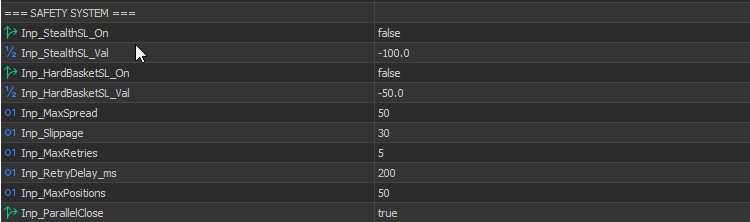
Safety System Configuration

Safety system settings

Stealth SL, hard basket SL, max spread filter, slippage control, retry logic, max positions, and parallel close — layered protection you configure once and trust.

Production Hardening

Persistent State Recovery

The software's full operational state is preserved continuously: active lattice positions, basket cycle data, trigger states, ghost progress, chart annotations, session statistics, and execution history. Terminal crash? VPS restart? Power failure? Command resumes exactly where it left off. No orphaned positions. No duplicate orders. No confused state.

Adaptive Broker Compatibility

Automatically detects broker execution modes (instant, market, exchange), fill policies (FOK, IOC, return), and lot constraints (minimum, maximum, step). Normalises all volumes to broker requirements without manual configuration. Tested across ECN, STP, and market-maker environments. Works out of the box.

Intelligent Retry Handling

When orders fail, Command doesn't just retry blindly. It differentiates between temporary failures (requotes, price changes, timeouts) that warrant retries and permanent failures (market closed, invalid parameters) that don't. Configurable retry count and delay. Every failure is logged with the specific reason.

Connection Health Monitoring

Continuous monitoring of connection state and quote freshness. Stale-quote detection prevents execution on outdated prices. Automatic reconnection handling ensures the EA recovers gracefully from network interruptions without manual intervention.

(Watch the demo — 5 years of basket cycles from Leon's Lattice Vision discovery, deployed and running )

Scheduling & Session Control

Per-Day Trading Controls

Enable or disable execution for each day of the week independently. Skip Sundays with thin liquidity. Avoid Fridays before close. Whatever your preference — the schedule is fully configurable.

Precise Session Windows

Define exact start and end times for the execution window with minute-level precision. Supports overnight sessions that span midnight. Active basket cycles are always allowed to complete even outside the session window — the scheduler controls when new interactions can occur, not when existing positions must close.

Trading Hours

Trading hours configuration

Per-day enable/disable, precise start and end hours — full control over when the EA is allowed to open new interactions.

Skipped Consolidation

Skipped consolidation settings

Control whether skipped levels are consolidated, recross-only, and minimum line thresholds for consolidation behaviour.

Dashboard & Notifications

On-Chart Status Dashboard

Real-time display of: aggregate basket PnL (colour-coded), cumulative session profit, maximum observed drawdown, peak margin usage, active position count, current distance mode, ghost progress indicator, and execution state. Everything you need to assess the EA's current situation at a glance. Bloomberg-inspired terminal aesthetic designed for extended monitoring.

Execution State Indicators

Clear status labels show exactly what the engine is doing: IDLE — awaiting interaction. FILTERING — ghosting phase active. ACTIVE — executing positions. SUSPENDED — soft stop engaged. HALTED — hard stop engaged. No ambiguity about what's happening.

Mobile Push Notifications

Instant alerts to your phone for: safeguard activation, execution suspension and resumption, and basket cycle completion. Stay informed without watching charts.

Email Notifications

Detailed email alerts for: execution events, state changes, safeguard triggers, error conditions, and lattice recalibration events. Full audit trail delivered to your inbox. All notification types are independently configurable.

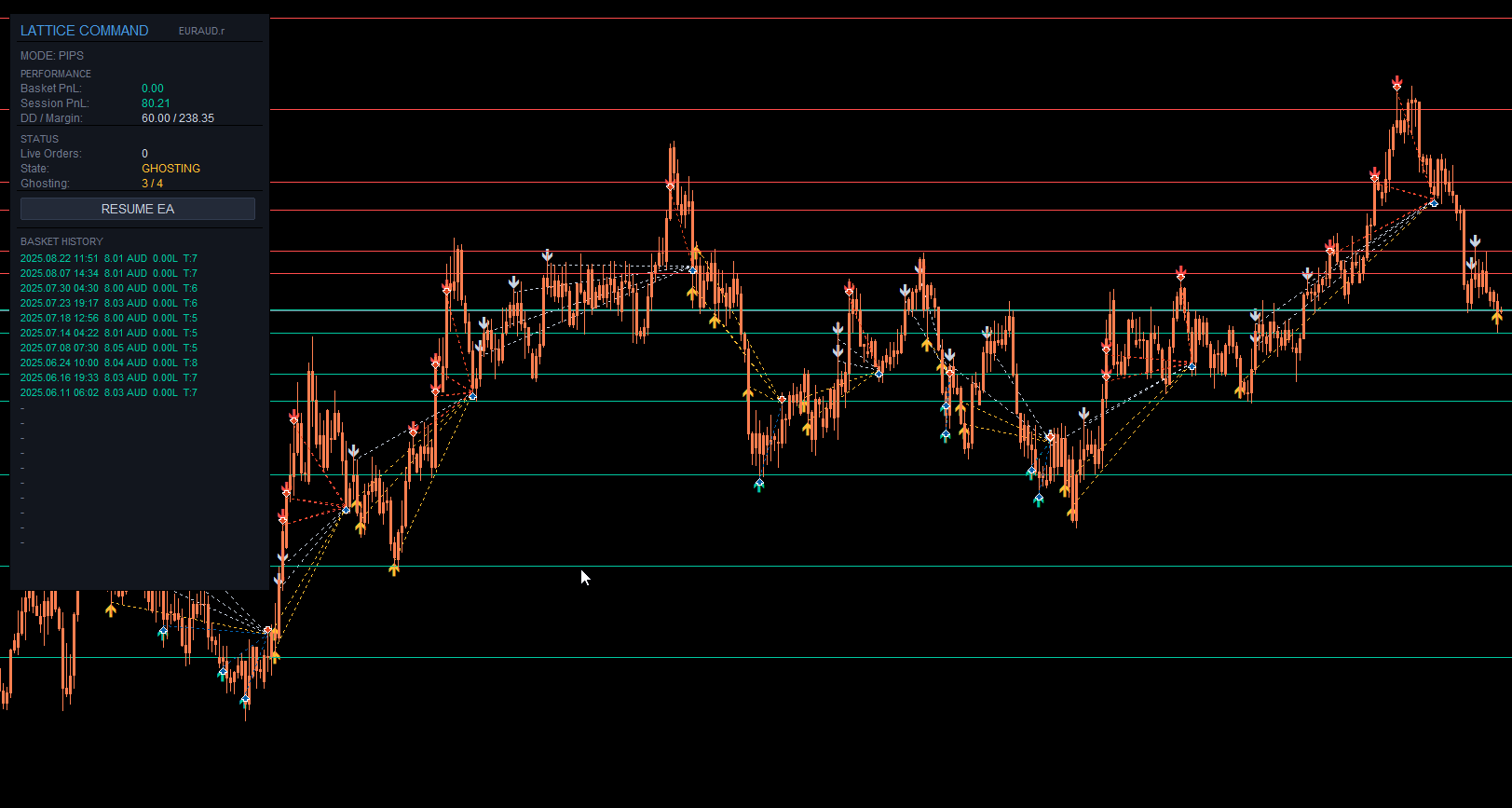
Live execution dashboard

Live execution — active basket with real-time PnL tracking, DD/Margin monitoring, session history, and execution state indicators

Notification Configuration

Notification settings

Push notifications, email alerts, and customisable subject prefix — stay informed wherever you are.

(Haven't watched the demo yet? See Leon's Vision-tested settings running through years of live data in minutes )

Use Cases

Strategy Tester Backtesting

Transfer parameters from Vision and run proper tick-by-tick backtests with Command's full execution engine. This is where you refine trigger options — test different ghost counts, enable recross confirmation, try consolidated execution — with realistic order simulation including slippage and spread modelling.

Live Account Deployment

Production-grade architecture for real capital. Persistent state survives anything. Multi-layer safeguards protect against runaway losses. Parallel close locks in profit fast. Adaptive broker handling works across environments. This is what Command was built for.

24/7 VPS Operation

Designed for unattended remote operation where reliability is everything. Handles the inevitable VPS restarts, connection drops, and maintenance cycles. State recovery ensures seamless resumption. Push and email notifications keep you informed without requiring chart access.

Multi-Instance Deployment

Deploy across multiple accounts, instruments, or configurations with independent state persistence for each instance. Each operates autonomously via configurable magic numbers. Run conservative settings on one pair and aggressive on another — each with its own safeguards, schedules, and notifications.

Prop-Firm Deployments

Validate parameters against funded-account constraints in Vision, then deploy with Command's safeguards configured to respect daily loss limits and maximum drawdown rules. The soft stop acts as your automated guardian — liquidating before you breach evaluation thresholds.

Forward Testing

Bridge the gap between backtesting and live. Deploy on a demo account with Command's full execution engine to observe real-time behaviour, broker interaction, and state persistence before committing real capital.

Watch It Work

Grand Opening Special

Get Lattice Command

Available exclusively on the official MQL5 Marketplace by MetaQuotes. Your purchase is protected by MetaQuotes' secure licensing system, with verified seller registration and automated product testing.

$329 USD $263.20 USD

One-time purchase • Free updates • Intro price ends March 31, 2026

Buy on MQL5 Marketplace

Why the MQL5 Marketplace?

All Cave & Fire Lab products are distributed exclusively through the official MQL5 Marketplace operated by MetaQuotes. This means secure payment processing, hardware-bound licensing that protects your purchase, verified seller identity, and every product version passes automated quality checks before publication. It's the safest way to buy MT5 software.

For the complete workflow, pair with Lattice Vision™ — the discovery half of the Lattice Suite.

Important Notices

Software Product Disclaimer

Lattice Command™ is a software product developed and published by Cave and Fire Group Pty Ltd., a registered Australian company operating under the trading name Cave & Fire Lab. Cave and Fire Group Pty Ltd. is a software development company. We are not a financial services provider, broker, dealer, fund manager, investment adviser, or holder of an Australian Financial Services Licence (AFSL). We do not operate in the financial services industry. We make software.

No Financial Advice

Nothing in this product, its documentation, marketing materials, website content, or any associated communications from Cave and Fire Group Pty Ltd. or Cave & Fire Lab constitutes financial advice, a recommendation to trade, or a solicitation to buy or sell any financial instrument. We do not provide financial advice, trading signals, strategy recommendations, or investment guidance of any kind. All parameters, configurations, and deployment decisions are made entirely by the user. Users should seek independent professional financial advice before making any trading or investment decisions.

Use at Your Own Risk

All use of Lattice Command™ is entirely at the user's own risk. Trading financial instruments involves substantial risk of loss and is not suitable for all individuals. You should only trade with capital you can afford to lose. Past performance — whether demonstrated through backtesting, forward testing, or any other method — is not indicative of future results. No representation is being made that any account will or is likely to achieve profits or losses similar to those discussed or demonstrated.

Software Limitations & Bugs

Like all software, Lattice Command™ may contain unforeseen bugs, errors, or limitations despite rigorous development and testing. Software is inherently complex and no developer can guarantee that every possible scenario has been anticipated or that the software will operate without error in all conditions. This product is intended for users who understand and accept the inherent limitations of software, including the possibility of unexpected behaviour, calculation errors, or execution failures. The software operates within the constraints of the MetaTrader 5 platform, broker infrastructure, network connectivity, and system resources available to it. Cave and Fire Group Pty Ltd. does not guarantee uninterrupted, error-free, or fault-free operation.

Conditions Beyond Our Control

The software cannot account for, and cannot protect against, all possible market or technical conditions including but not limited to: extreme volatility, liquidity gaps, flash crashes, broker insolvency, platform outages, third-party software interference, operating system issues, hardware failures, network interruptions, regulatory changes, or any other conditions outside the direct control of the software.

Limitation of Liability

To the maximum extent permitted by applicable law, Cave and Fire Group Pty Ltd., its directors, employees, contractors, and affiliates shall not be liable for any direct, indirect, incidental, consequential, or special damages arising from the use of, or inability to use, this software. This includes but is not limited to financial losses, lost profits, trading losses, data loss, or business interruption, regardless of whether such damages were foreseeable or whether Cave and Fire Group Pty Ltd. was advised of the possibility of such damages.

User Responsibility

By purchasing and using this software, users acknowledge that they have read and understood these notices and accept all risks described herein. Users are expected to: thoroughly understand the software's functionality before deploying with real capital; test all configurations extensively in a risk-free demo environment; maintain appropriate risk management practices independently of the software; ensure their use complies with all applicable laws and regulations in their jurisdiction; and seek independent professional financial advice where appropriate.

Trademarks

Lattice Command™, Lattice Vision™, Ghosting Technology™, and Cave & Fire Lab™ are trademarks of Cave and Fire Group Pty Ltd. MetaTrader 5 and MQL5 are trademarks of MetaQuotes Ltd. All other trademarks are the property of their respective owners.
The Discovery Half

Lattice Vision

Discover it with Vision. Backtest and deploy it with Command.

View Lattice Vision